


Full System Simulation
Why Hardware-Based Testing Won’t Cut It for Today’s DevOps Teams

The Landscape of Programming & Development Demands a New Approach
To a DevSecOps professional, time is so much more than a precious commodity.
It’s also a measure of speed, performance, and one’s ability to stay competitive in today’s complex and connected landscape. Time, and your ability to leverage it well, will ultimately determine your organization’s ability to scale, and the speed at which it can do it.
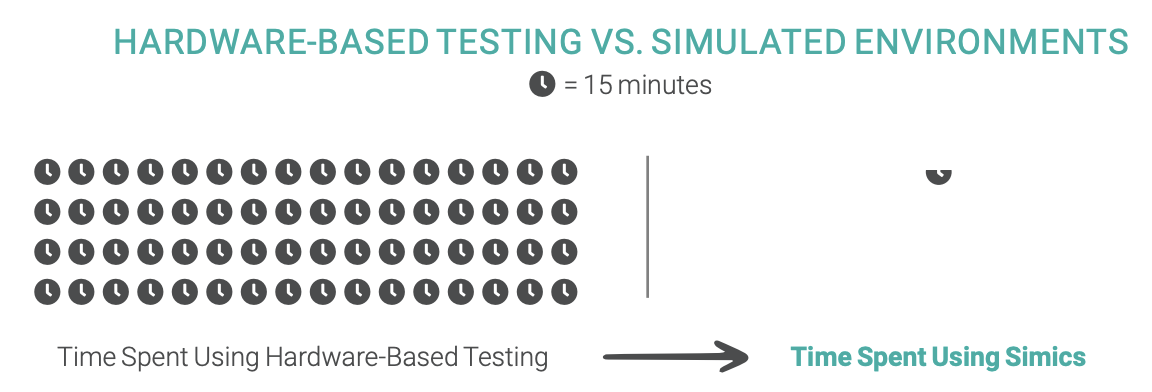
But what if you could take everything you’ve come to accept about time constraints on your teams and turn it upside down, allowing you to conduct up to 80 percent of your tedious hardware-based software testing 90 percent faster?
This is now possible with full-system simulators, also known as digital twins, that readily replace the hardware-based testing that is currently hindering your team’s ability to scale. At Wind River®, we’ve been perfecting the art of full-system simulators using Wind River Simics, and the impact on our DevSecOps team’s ability to test, innovate, and scale has been astounding.
And while a full-system simulator may sound like a luxury reserved for enterprise-level organizations, businesses of all sizes will need to adopt this style of testing in the coming years. Customer and company expectations for speed and accuracy in today’s world of complex, multilayered architectures will demand it due to the limitations of hardware-based testing. It’s only a matter of time.
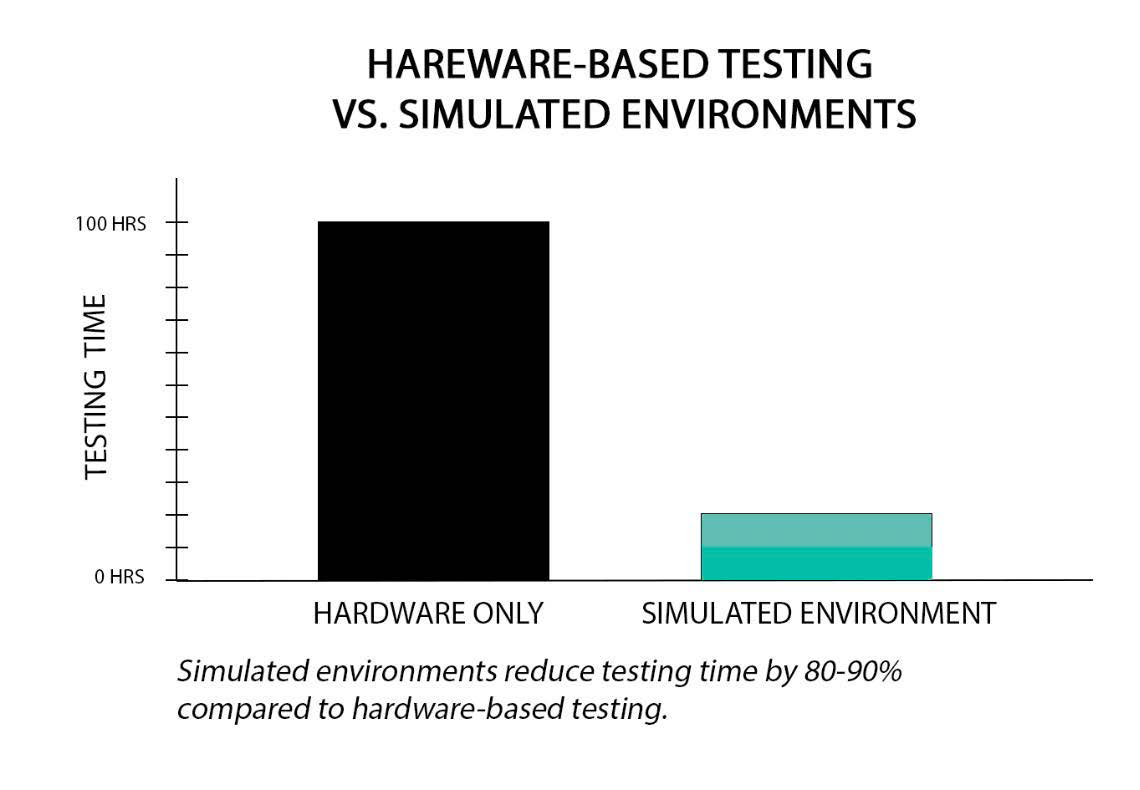
SIMULATED ENVIRONMENTS REDUCE TESTING TIME BY 80-90% COMPARED TO HARDWARE-BASED TESTING.
HARDWARE-BASED TESTING VS. SIMULATED ENVIRONMENTS
The Limitations of Hardware-Based Testing
When DevSecOps teams are limited to hardware-based testing, they frequently encounter specific hurdles that hinder their ability to accomplish goals efficiently. A few common ones are:
- Hardware is fixed in physical locations, making it difficult to scale tests or collaborate with global teams.
- Because hardware tests are live, they tie up the system and confine teams to running tests during specific hours of the day.
- Hardware is not always compatible with all operating systems, slowing testing time.
- Simultaneous hardware-based tests are limited to a small quantity (and sometimes no more than one at a time).
- In some cases, the final hardware is not yet ready for testing.
- Finding and fixing errors can take way too long with hardware-based testing because teams can’t reverse execute or record testing sessions.
When DevOps professionals “zoom out” to see hardware-based testing as the hindrance it is, rather than the default we’ve come to accept, it’s easy to see how simulation-based testing offers teams the opportunity to use today’s technology to sprint past their competitors
Digital twin simulation testing offers teams the ability to collaborate, run simultaneous tests from anywhere at any time, create virtual digital twins compatible with all operating systems, and record sessions so that debugging efforts go from 16 hours to 16 minutes.
What Is Full System Simulation?
Full-system simulation is a true paradigm shift in the DevSecOps space, and the impact on an organization’s ability to iterate and scale cannot be overstated.
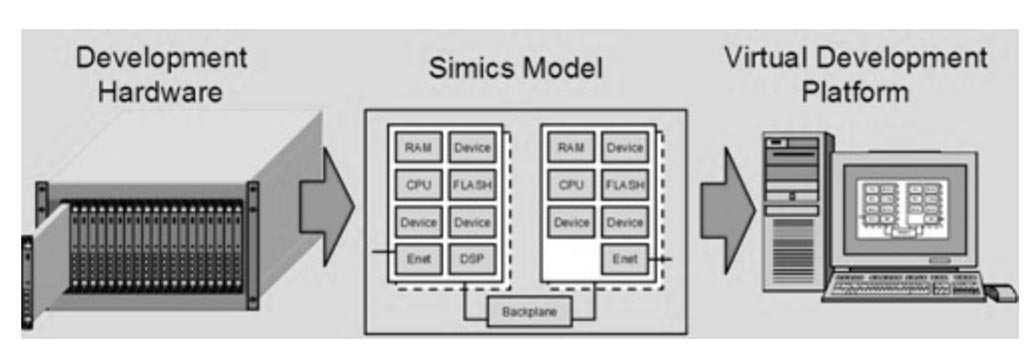
Having a simulated digital twin of your hardware allows you to run the majority of your software tests in a simulated representative hardware environment, reducing your team’s reliance on manual and time-consuming hardware-based testing. Since repetition in a tried-and-true environment is necessary–especially in deterministic simulation–this ability to iterate and troubleshoot rapidly in a simulation of any complex system becomes game changing, to say the least.
Deterministic simulation and why it matters
Simulation with determinism is when we seek to achieve the same results every time we run and record something several times, creating a baseline. Once this baseline is created, we can create intentionally bad, glitchy, or difficult testing environments and situations to test software. We can aim to trick or break the software in a controlled way as we exercise parts of its code.
This means teams can go from running single hardware-based tests to multiple tests at a time. With full system simulations, you move from, say, one RF, to multiple at the same time, and scale it using simulation technology. You can also gain insights into the interaction between different processors. For instance, by leveraging this technology, you can go from one CPU to an entire simulation of the complete base station, and simulations can be recorded and shared with colleagues in various locations.
“We know that building software is important, but much more important is about testing the software so that the software that we build stand the test of time.”
— James Hui,
Senior Solution Architect,
Wind River
Webinar: Using Simulation
Technology to Launch a Robotic
System Program

The Benefits of Using Simulation Testing
While there are many quantifiable benefits–our customers report 80-90 percent reduction in testing time–there are certain benefits we’d like to highlight in particular, as they have such a phenomenal impact on your organization.
Testing software code in full-system simulators promote four key things:
- Developer collaboration
- Scalability
- Rapid-reverse executions and saving of recordings
- Automation of future tests
Why developers need a collaborative environment
There’s never been a more perfect moment in time for such a paradigm shift in the DevOps space. We know that hardware-based testing is not going to cut it long-term for organizations that want to remain competitive
Today’s diverse and hyper-connected landscape of complex systems demands developers and programmers collaborate and communicate. If system changes or errors are not communicated, teams take turns on hardware-based tests and lose valuable time.
Connectivity to the simulated environment allows developers to perform and share a simulation, exchange commentary and collaborate toward solutions and innovations.
How simulation ensures rapid scalability When you’re able to reduce programmer development and testing time by 80–90 percent, you’re able to scale your development operations like never before. Teams go from testing with one CPU to a complete system with multiple nodes and simulations working simultaneously.
How to Get Your Software Development Team Started with Simics
If you only tested the Titanic’s durability in a harbor, you might think it’s unsinkable. But out in the icy North Atlantic, that wasn’t the case. With today’s simulation technology, various scenarios could have been run to inform and equip the ship.
This is why rigorous, worst-case-scenario testing is so critical in today’s landscape. Today’s developers can mimic real-world scenarios like never before.
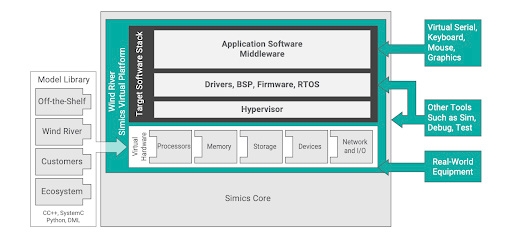
Simics simulates systems both small and complex. With Simics, developing software is easier, faster, and more secure, thanks to built-in smart security and safety functions. This simulation technology not only helps speed up these processes, but also cuts costs and provides performance metrics that enable us to operate more efficiently day after day.
For developers who need to make the case for simulation-based testing, the best thing to do is to start testing. Testing small but meaningful changes and documenting the results can help persuade skeptics. And of course, the data is undeniable.
Why Choose Simics
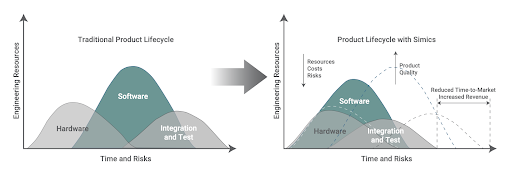
Simulation testing gives DevSecOps teams the one thing they always need more of—time.
Wind River has spent the last several years perfecting an effective and efficient methodology for simulation-based testing, and we found that we were able to bring 60–80 percent of our hardware-based tests into a simulated environment, reducing our time spent on testing by up to 90 percent. And because we recognize collaboration as a key to successfully and efficiently developing software, it is critical to ensure Simics is easily accessible by your whole team.
We’re excited for this new world of “Simulation as a Service,” and Simics is uniquely designed to help DevOps save time when it comes to software testing. In fact, Wind River customers report that they’re saving 80% to 90% of their time after adopting simulation into their workflow.
Ready to learn more about how our full-system simulation platform can help your business?
Let’s connect, or check out our webinar, Using Simulation Technology to Launch a Robotic System Program.