Path to Secure Linux Platforms
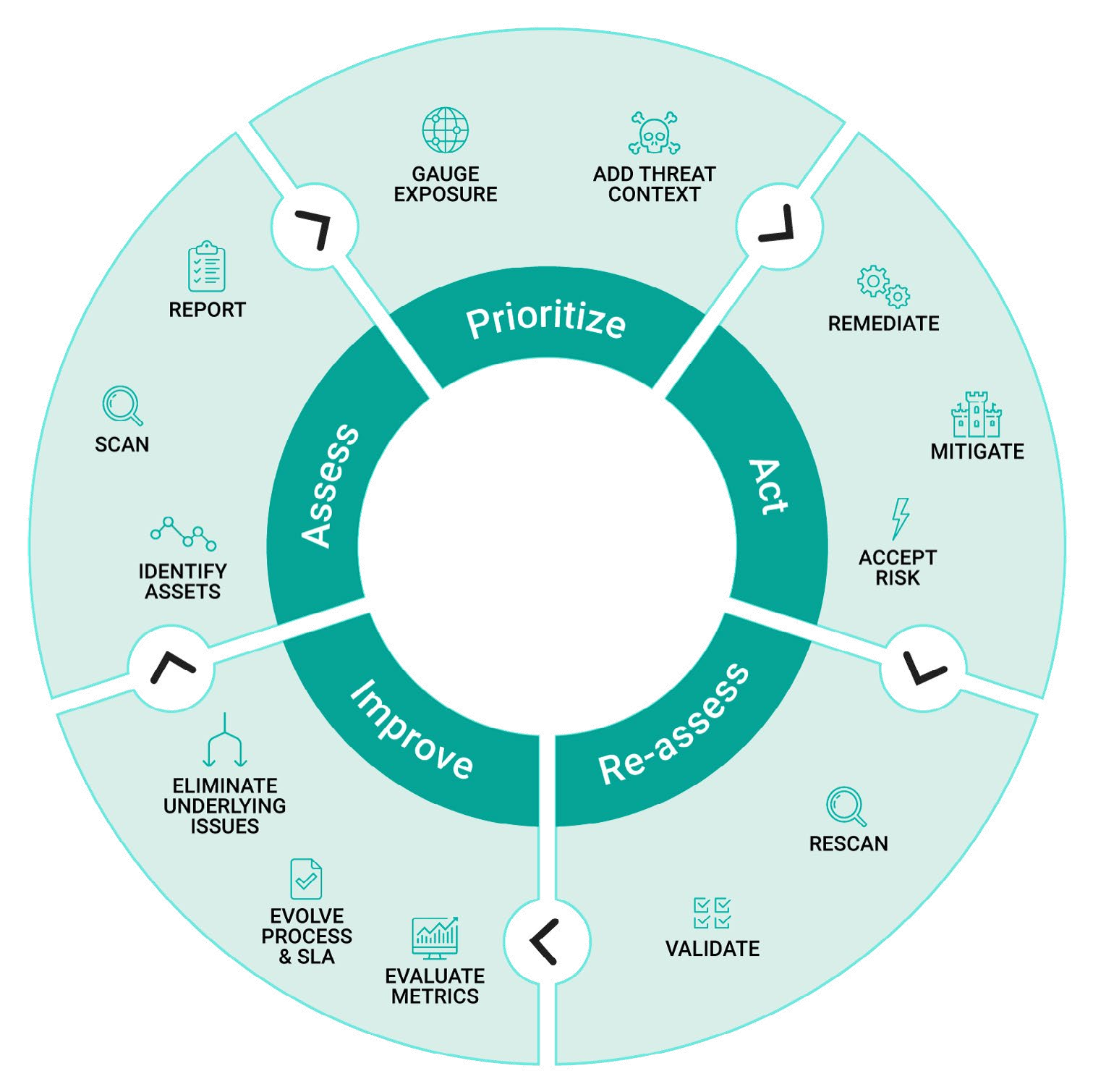
The vulnerability management lifecycle: A continuous improvement process model for software solutions
Once a vulnerability is detected, it takes 97.8 days on average to fix it
Companies relying on open source software are growing increasingly aware of how important it is to understand all its dependencies.
Your software solution is only as strong as its weakest link. 73% of organizations are searching for best practices to continually improve and evolve software security practices. This white paper will focus on how companies relying on Linux platforms can take a proactive approach to security.

Security is cyclical by nature. Best practice for managing vulnerabilities involves identifying, addressing, testing, evaluating, improving on the process, and restarting it. Done right, it is a never-ending cycle of continuous improvement.
Industry polls report that about 40% of companies don’t have a plan or policy for the handling of CVEs. If that describes your company, this is the moment to change that. If you do have a plan for addressing CVEs, then this white paper will help you assess and improve upon your plan.
Open source gives software an edge — and carries inherent risk
As companies increasingly adopt open source software, it’s vital to understand the vulnerabilities that exist and the ripple effect of any dependencies.
Open source is critical to accelerating the software development of intelligent connected devices and embedded systems running at the edge. Yet open source carries inherent risk due to ever-increasing security vulnerabilities. In fact, Positive Technologies reports that 84% of Linux software projects have high-risk vulnerabilities.

As organizations push development boundaries, the inevitable CVE technical debt can mount, and impact project success. Securing your embedded Linux platform is a full lifecycle responsibility, starting with understanding your areas of exposure and impacted code and flowing up to remediation of high-profile CVEs affecting your solution.
WEBINAR POLL
Who will address critical Linux vulnerabilities?
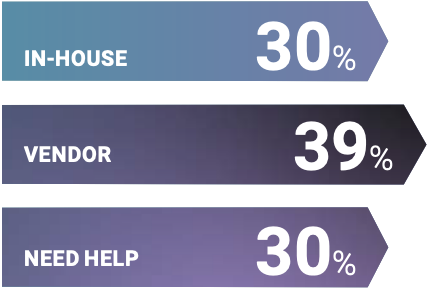
In our webinar poll, 30% of attendees felt they could fix all critical and relevant vulnerabilities, 39% expected their Semi partner or Linux vendor to handle it, and over 30% admitted to needing help with this or not fixing anything at all.
“At Wind River, we have 40 years of experience delivering mission-critical, intelligent systems with the highest safety standards.
— Kevin Dallas,
President &
Chief Executive Officer
Wind River

Security is a continuous vulnerability management lifecycle
Adopt a cyclical process to actively monitor, assess, prioritize, and remediate CVEs throughout the product life cycle.
- Identify and prioritize high-risk CVEs
- Analyze source code to determine whether a CVE impacts your project
- Resolve and mitigate high-risk CVEs
- Manage ongoing platform security requirements
“The best practice is to manage the vulnerability lifecycle and to follow a continuous path to protection.”
— Seth Cramer,
Services Delivery
Director
Wind River

Discover CVEs early and proactively meet them head on
Protect the trust of your users by committing to a lifecycle of continuously improving vulnerability management.
As you can see from the diagram on the previous page, the model we are proposing is cyclical in nature. However, the most logical starting point in the process will be assessment.
1.Assessment
The first steps are to identify your assets, conduct a scan, and report on findings.
Identify Assets
- Your assets will be in the form of a manifest file or an SBOM. An SBOM, especially one in the SPDX format, provides much more detailed information than a manifest file.
- Even though hackers can get their hands on your SBOM if they are motivated enough, it’s not advisable to share your SBOM publicly.
Scan
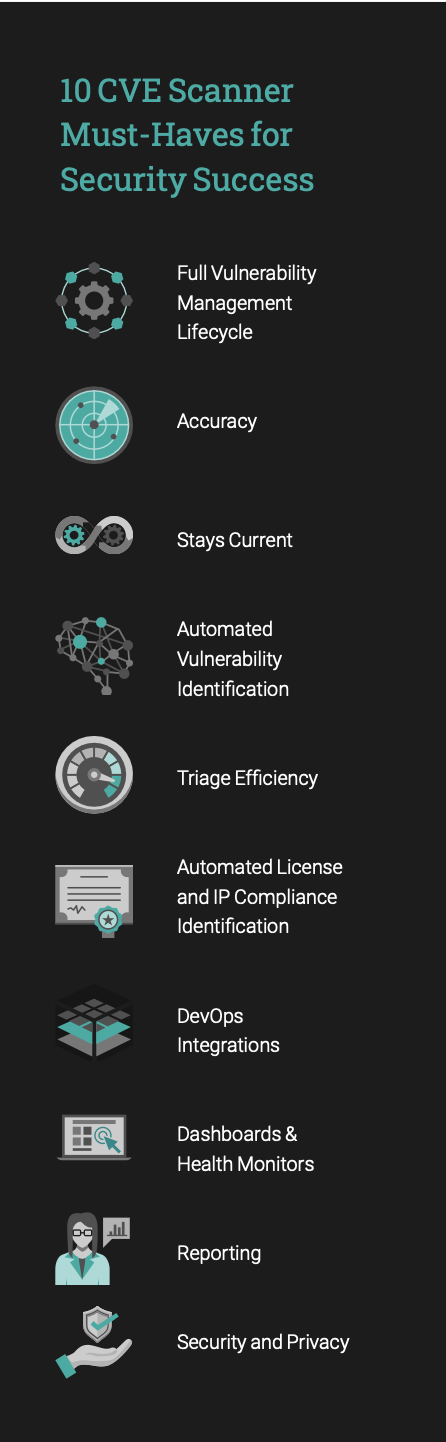
- There are a number of scanners out there, but not all scanners are created equal. Check out Wind River’s white paper, “10 CVE Scanner Must-Haves for Security Success” to help you evaluate what makes a good scanner. A round up of those top 10 are listed at right.
Reporting
- Reports should be customizable to focus on your most important attack vectors, whether threats are network, adjacent, local or physical.
- Ideally your report highlights vulnerabilities that are relevant to you with easy-to-digest data visualizations such as charts and tables.
- Like most scanners, Wind River reports CVSS scores on two versions: v2 and v3. If you’d like more details on why the ranking HEX 6C9694 and criticality can change significantly between v2 and v3, look at the specifications documents at www.first.org.
Remediate, mitigate, and determine risk
- The good news is, you can leverage a partner like Wind River to perform the fix for you. As you evaluate partners, look for one that has worked with multiple platforms, already has a fix ready that has been validated on your version, has solved this fix before, and can do it again. Ideally the solution has already been tested extensively and proven effective. Additionally, evaluate a potential partner for speed, accuracy, and responsibility. Your partner should be able to not only help with the standard version of the issue at hand but also solve for the issue as it pertains to your particular solution.
Mitigate
- When you choose to mitigate, you are adjusting your solution to make the issue less harsh or hostile to your environment. You can make the offending aspect of your solution irrelevant (remove the impact), firewall it (put something in the way like creating a self-check in your software), or remove it completely.
Accepting the Risk
- Accepting the risk involves understanding the probability of occurrence (what are the odds?), understanding the impact if the issue is not correctly fixed, and evaluating the effects of the speed with which a solution is deployed; the longer a vulnerability is out there the more of a risk it poses.
4. Reassess
Once you’ve acted by either remediation or mitigation, it’s time to reassess. Do a rescan of the what you did to evaluate it and validate what worked.
Rescan
- Reassess assets to produce another manifest file or SBOM that incorporates the changes that you’ve made. NOTE: Remember, relying merely on a manifest file will be a challenge because it only knows about the version and provides limited information to your security team. If you use an SBOM you might actually be able to track the patches that have been applied to your solution.
- It’s vital that you stay current, whether with the SBOMor the CVE knowledge base. Having updated results enables you to efficiently triage the vulnerabilities as they’re coming in while making sure you’re being effective in remediating or mitigating the CVEs that you’re addressing.
- A critical component of a re-scan is making sure that your partner solution integrates with your DevOps — it needs to be able to understand the whole bug tracking lifecycle for your solution and have that info automatically feed into your scanner.
Continually evolve process and eliminate underlying issues
Validation
- Whether your remediation involved back porting or up-revving, it’s important to validate that it was successful. Both involve new variables — back porting comes with new code and up-revving comes with new features and possibly new CVEs and packages.
- When you up-rev, adding other packages could make it necessary for you to update your application as well to use the new interfaces brought on by these new packages.
- Testing to determine whether the CVE has been fixed can be challenging. A lot of CVEs are almost theoretical in nature and as a result do not have an easy test case to show whether or not the vulnerability has actually been resolved.
- Once a CVE has been addressed, the common course of action is to run a smoke test designed to answer the question: does your solution still do what it’s supposed to do, and function as expected? Once you’ve ensured that, you progress through integration testing, regression testing, system and full end-to-end testing. Whatever Semi vendor or partner you are using, make sure it is running all these tests.
5. Improve
You’re going to run this process again. Once you’ve completed the cycle, this stage looks at how you can improve upon your lifecycle.
Evaluate Metrics
- Were your metrics for success appropriate to gauge the outcomes of your vulnerability response? For example, you may choose to re-evaluate the manner in which you measure how quickly and accurately the validation went.
Evolve Processes & SLA
- Develop a plan to improve your processes and SLA (the service level agreement between client and customer) to address the CVEs and reflect changes.
Eliminate Underlying Issues
- Get to the root of any underlying issues to set y ourself up for success as you redeploy your process.
In Closing
The Linux Foundation reports that, “It has been estimated that free and open-source software (FOSS) constitutes 70% to 90% of any given piece of modern software solutions.” Companies are becoming more aware that as they use open source software they need to identify dependencies on the open source components that they’re using.
These companies need to proactively and regularly monitor all components for usability, trustworthiness, and vulnerabilities. The key takeaway here is it’s a never-ending process — you’re always evolving, always improving.
But many companies are falling short. According to the Open SF Foundation, 50% of companies have a security policy, 30% do not, and 17% of respondents didn’t know if they had one or not.
Companies need to adopt best practices for every stage in the vulnerability management lifecycle and have a CSIRT (computer security incident response team) who can understand the impact of a vulnerability and notify your customers to explain what you’re doing about it.
To achieve and maintain platform stability you need a solid CI/CD pipeline implemented internally or managed by a partner. Your pipeline should incorporate regular smoke tests of your CVE fix, and ongoing testing — perhaps a nightly integration test, a weekly system test, and a monthly full test. Specific to the coding of the CVE fix, your pipeline needs to integrate the fix into Linux and all your layers, automate the architecture that you’re looking for, automate testing, review tests with partners and peers, then merge those components into whatever repo(s) your organization uses.
Once your developers have integrated your CVE fix into the pipeline, you’ll need to make sure your open source automation server (for ex. Jenkins) can present that information for consumption to your organization and to your customers to prove that the CVEs have been resolved.
The good news is, there are partners who can help you manage all of this. Please reach out to Wind River to see how we can support you.